

Every rule here comes from Google's own help pages, and the guide is current as of November 2026. The screenshots are from our own Business Profiles, taken on 18 November 2026, with private details blurred.
What a finished profile looks like
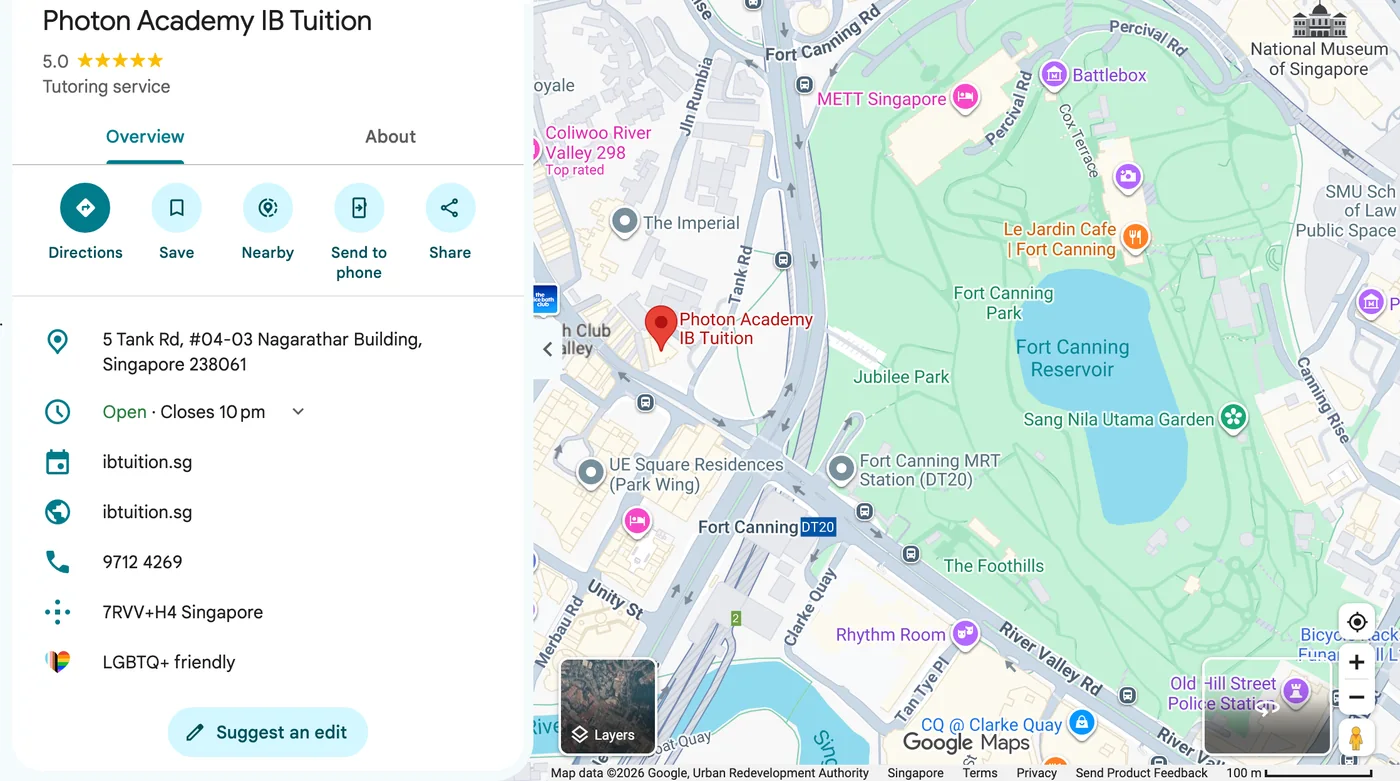
This is Photon Academy, the IB tuition centre we run at 5 Tank Road. Most of what you see was filled in once by the owner: the category, the address, the opening hours, a booking link, the website and the phone number. The 5.0 rating comes from 76 Google reviews.
Notice the Suggest an edit button. Anyone on Maps can suggest a change to your listing, so check your details now and then.
Before you start: check that you qualify
Google's guidelines decide who can have a profile:
- You meet customers in person. Either customers come to your address during your opening hours, or you go to them.
- Your address is a real place. A virtual office isn't eligible, and P.O. boxes or mailboxes at remote locations aren't accepted.
- A co-working office needs signage and customers. You can list one only if it has clear signage and receives customers there during business hours.
- One profile per location. Don't make a second profile for the same place, in the same Google account or another one.
Two Singapore cases come up often:
- You run the business from home. If customers don't come to your flat, you can still have a profile as a service-area business, with your address hidden. Google's own example is a plumber who works from home.
- Your company uses a registered address service. If your ACRA address is a corporate secretary's or virtual office address, don't put it on your profile. Use the place where you actually meet customers, or set service areas instead.
Step 1: Check whether you're already on Google
Search Google Maps for your business name and area. Your business may already be listed, even if you never set it up.
- Listed, but no one manages it? On a computer, open the listing and select Claim this business, then Manage now. In the Google Maps app, open the listing, tap About, then Claim this business.
- Listed, and someone else already verified it? You can ask the current owner for access by requesting ownership.
- Not listed? Create a new profile in step 2.
Step 2: Create your profile
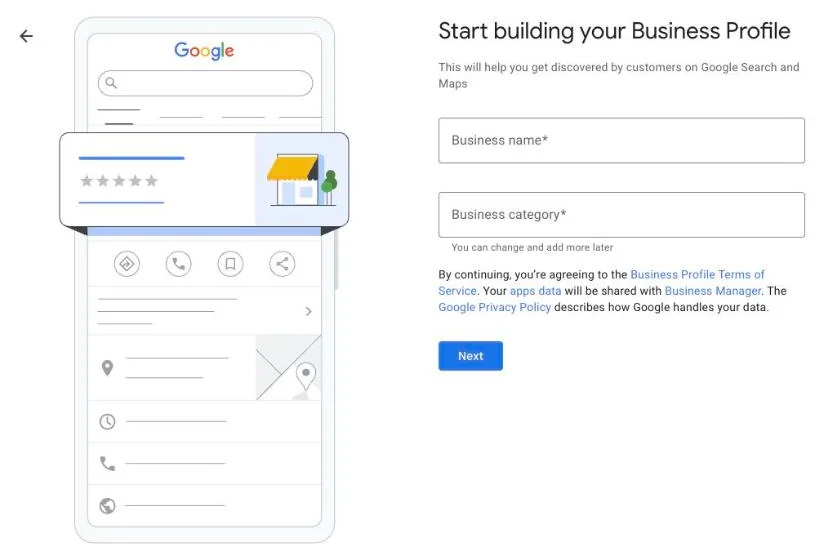
- Go to business.google.com/add and select Add your business to Google. Sign in with a Google account the business will keep, not a staff member's personal account.
- Enter your business name exactly as customers see it on your shopfront, website and receipts. Google doesn't allow extra words, such as a tagline, your area, your hours or a phone number.
- Choose your category. Pick the one that describes your core business, as specifically as you can. Google asks you to use as few categories as possible.
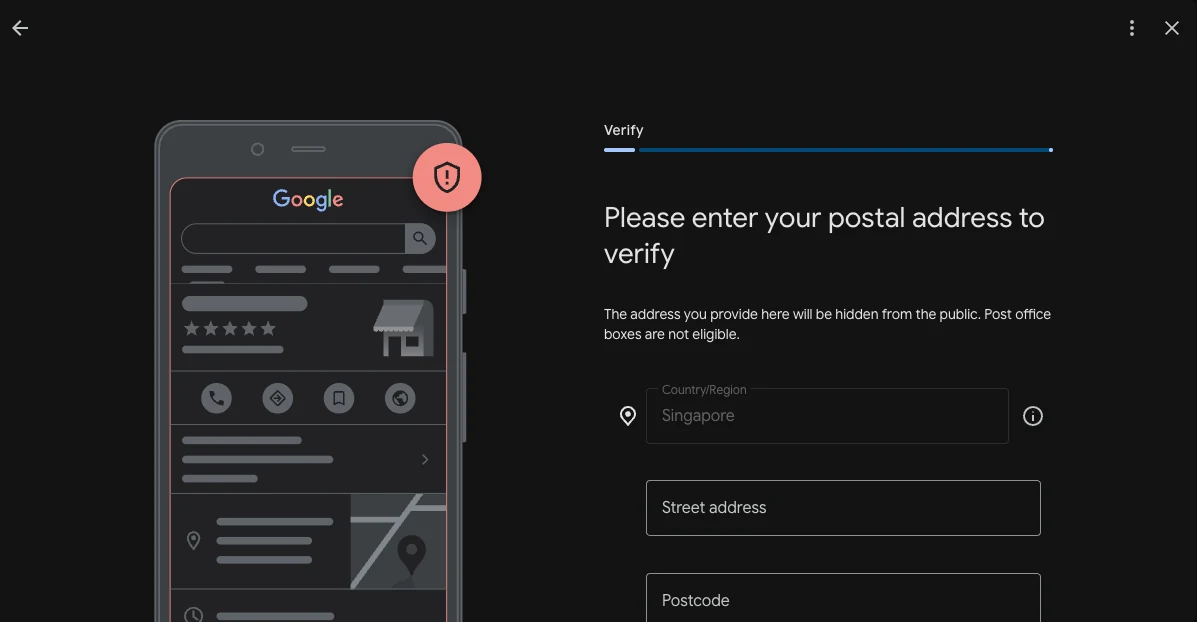
- Add your address, or your service areas. If customers visit you, add your address. If you go to them, leave the address off and list the areas you serve: up to 20, by town, postal code or area, within about 2 hours' drive of your base. You can't set a radius.
- Add your phone number and website, then move on to verification.
Once you're verified, add a second owner or manager, so the profile isn't stuck if one person leaves.
Step 3: Verify your business
You don't get to pick the method. In Google's words, verification methods "are automatically determined by Google and can't be changed". You may be offered one or more of these:
Phone or text
A code by call or SMS. Use a line a person answers: automated phone systems can't receive the code
Email
A code sent by email
Live video call
A video call with Google, only during your location's business hours
Video recording
A video of your business that you record and send
Postcard
A code sent by post to your address. It expires after 30 days
For a live video call, Google asks you to be ready to show three things:
- Where you are: your outside signs, or a street sign.
- Your business: your products, equipment or branded tools.
- That you manage it: an employee-only area, or your keys.
Google says reviews take up to 5 business days, and on rare occasions longer.
Why verification fails, and what to do
- Postcard: don't edit your name, address or category while you wait, because that cancels the code. Asking for a new code also cancels the one already in the post.
- Phone: automated phone systems can't receive the code.
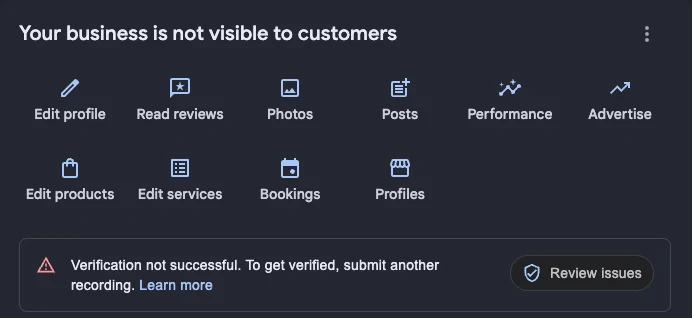
- Video: a "Review issues" notice means Google didn't accept your video. Follow the steps on screen.
- "Get verified" appears again: Google couldn't fully verify you. Try again, or try another method.
Step 4: Fill in what customers look for
Google says businesses with complete and accurate information are more likely to show up in search. So fill in every part that applies to you:
- Opening hours. Your customer-facing hours, plus special hours for public holidays. If you only see customers by appointment, leave hours off: Google says businesses that operate only by appointment shouldn't provide them.
- Description. What you do, for whom and where, in plain words.
- Services or products, with prices where you can.
- Photos. Your shopfront, so people recognise it when they arrive, the inside, and your work.
- A booking link, if customers book online.
- Attributes that apply to you, such as wheelchair access.
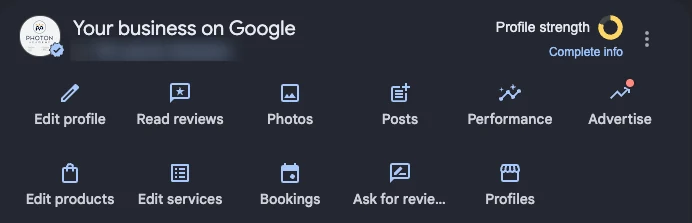
When you're signed in, searching Google for "my business" lists the profiles you manage and opens each one's dashboard, where you edit all of this.
Step 5: Your first week
Ask for reviews
Send your review link to all your recent customers
Reply to every review
Thank people by name, and put right what went wrong
Match your details
The same name, address and phone on your website, Facebook and directories
Check monthly
Calls, website clicks and direction requests
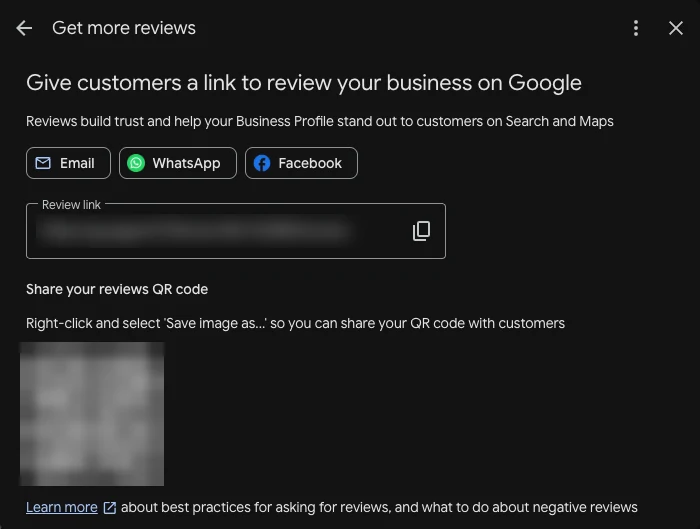
On your dashboard, Ask for reviews opens a box with your review link and QR code. Our guide to the Google review QR code and link shows where to put them, a message you can copy and Google's rules on asking.
For the rest of local SEO, from service pages to local links, read our local SEO guide for Singapore.
Mistakes that break Google's rules
Google can suspend profiles that break its guidelines, and it removes reviews that break its review policy. These are the common mistakes:
Extra words in your name
Keywords, your area or a tagline
A virtual office or remote mailbox
Not eligible as an address
A second profile for the same place
One profile per location
Showing a home address customers never visit
Hide it and set service areas
Rewards for reviews
Google removes such reviews and can restrict accounts
Hours for an appointment-only business
Google says these shouldn't list hours
Watch out for paid "Google" help
Google warns about calls, emails and texts from people who offer to help with your Business Profile for money, including people who say they are from Google. Its help page is clear:
- Google doesn't charge for Business Profile.
- Google will never ask for a one-time password (OTP) or PIN.
- Google will never try to get you to pay to keep your profile, or to have it verified or reinstated.
Paying an agency you chose to manage your profile is a normal business decision. Never pay a cold caller who says they are Google, and never read out a code sent to your phone.
What it costs
A Google Business Profile is free, and Google says there's no way to pay for a better local ranking. The cost is your time to set it up and keep it current.
If you'd rather have it done, our Local SEO service is from S$600 a month. It covers your Business Profile and Maps, page fixes and a monthly report. Our free website check looks at your Business Profile too.
Frequently asked questions
Is a Google Business Profile free?
Yes. Google doesn't charge for it, and it won't ask you to pay to keep it, verify it or reinstate it.
How long does Google Business Profile verification take?
Google says verification reviews take up to 5 business days, and on rare occasions longer. A postcard code expires after 30 days.
Can I choose how to verify my business?
No. Google decides which methods you're offered, and they can't be changed.
Can I have a profile without a shop or office?
Yes, if you go to your customers. Leave your address off and list up to 20 service areas. Virtual offices and remote mailboxes aren't eligible.
Can I use my home address?
You can run the business from home. If customers don't come to you, hide the address and set service areas instead.
Is Google My Business the same as Google Business Profile?
Yes. Google My Business is the old name for Google Business Profile.
Can I add keywords or my area to my business name?
No. Google doesn't allow extra words in your name, such as a tagline, location details, hours or a phone number.
Someone called saying they're from Google. Should I pay them?
No. Google says it doesn't charge for Business Profile and will never ask for a one-time password or PIN. It will never try to get you to pay to keep, verify or reinstate your profile.
Sources we used
- Google Business Profile Help: Add or claim your Business Profile — starting at business.google.com/add, claiming with "Claim this business" and "Manage now", requesting ownership (read 18 Nov 2026)
- Google Business Profile Help: Verify your business on Google — methods set by Google, live video calls during business hours, what to show on video, up to 5 business days, why verification fails (read 18 Nov 2026)
- Google Business Profile Help: Manage your service areas for service-area and hybrid businesses — removing your address, up to 20 areas, about 2 hours' drive, no radius (read 18 Nov 2026)
- Google Business Profile Help: Guidelines for representing your business on Google — names, categories, addresses, co-working offices, virtual offices, appointment-only hours, one profile per location, suspension (read 18 Nov 2026)
- Google Business Profile Help: Help protect your Google Business Profile — no charge, no OTP or PIN requests, warnings about paid "help" (read 18 Nov 2026)
- Google Business Profile Help: Tips to improve your local ranking on Google — complete information, photos, reviews, no paid local ranking (read 18 Nov 2026)
- Photon Academy IB Tuition on Google Maps — our own centre's profile, captured 18 November 2026
- Search volumes: Ahrefs Keywords Explorer, Singapore, 18 November 2026